· Agentic Engineering · 5 min read
Better AI Code: The Feedback Loop That Changes Everything
By implementing a feedback loop you are able to dramatically improve the quality of AI generated code.
Why Coding Agents produce inconsistent quality?
I’ve spent plenty of time improving my AI coding workflows. Something worked well, something not. But now I can share what always works for me.
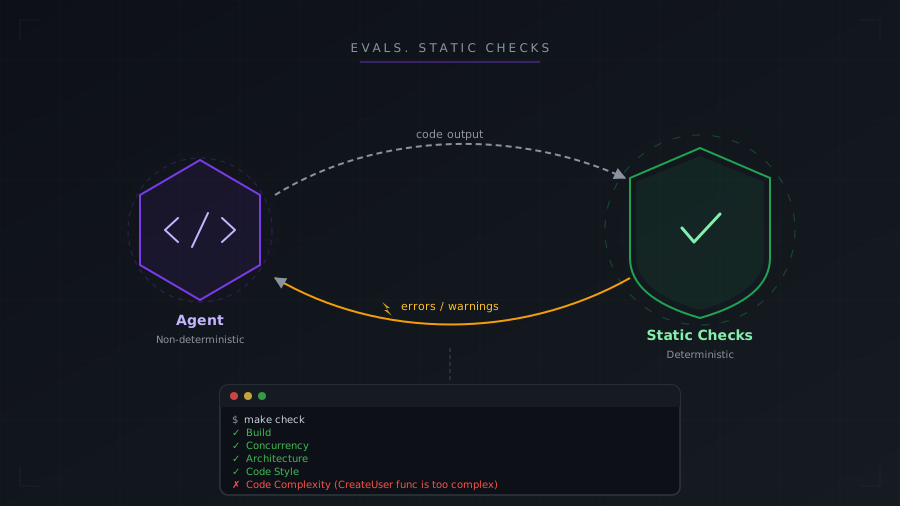
Coding Agents are based on LLMs. LLMs are non-deterministic. Ask an LLM to review the same code twice, and you might get “looks good” one time and “this has a critical bug” the next. A compiler is deterministic. Feed it the same code 10 times and you get the same result.
Since Coding Agents are non-deterministic, the output varies from prompt to prompt, from session to session. That’s why we need guardrails to reduce the impact of non-determinism when using AI for coding.
What is an eval?
An eval is a test for your AI. It checks whether the output is correct, consistent, and matches your standards. Evals might be deterministic and non-deterministic. Asking AI to review AI-generated code is non-deterministic, but it still makes a lot of sense.
From my experience, introducing evals brought the strongest effect on AI-generated code. I’ll cover each of these in more detail in the next posts. For now, let’s walk through the big picture.
Static checks
If something can be verified by a deterministic tool, do not rely on a non-deterministic LLM. Run the tool, give the result back to AI.
- Can an agent know if code compiles? - No
- Can an agent run a build command and see if it compiles? - Yes.
Build
The easiest way to implement that would be adding this line to your guidelines file:
After any code changes YOU MUST ensure that the project builds with no errorsSimple and straightforward.
Linters
A linter is a tool that automatically checks your code for style, errors, and complexity issues. There are linters for any language, and many engineers underestimate their value when working with AI. For example, my favorite one is cognitive complexity check. It checks how difficult code is to understand. Sometimes my agent is going nuts, feature works, but the code is far from ideal. But after code is generated, agent can run linter, and if cognitive complexity is above the threshold, then it goes back to refactor and simplify the code. Again, enabling it is simple.
After any code changes YOU MUST:
- [] Run linter and fix errors
- [] Run build to ensure it compiles without errors
And that is only the tip of the iceberg.
Code Review Agents
Imagine you are developing a feature without AI for 10 hours straight. Now you have to do a code review of your code. How effective is it? Better to ask a colleague to review it with fresh eyes.
Same thing with AI agents. One agent implements the feature, another one is invoked to review the code. An agent with fresh context will do a much better review than the agent that did actual coding. Simple to enable:
After any code changes YOU MUST:
- [] Run linter and fix errors
- [] Run build to ensure it compiles without errors
- [] Run agent to review the code you just implemented. Agent should check for potential bugs and code complexity. Fix errors reviewer found.
As you can see, you can start simple. No hooks, no skills, no specialized agents. Even those 5 lines in your guidelines file will make a difference. Later you can build on top of that and create agents or skills following specific review rules. But that is later.
Automated tests
Tests are deterministic. They tell if your system works as expected. If we give this tool to AI then it can be sure that nothing is broken and system behaves as expected. Or, agent gets instant feedback about something being broken, so instead of shipping broken code to you, it analyzes the reason and fixes it.
Of course, it depends a lot on the quality of the test suite. But now you have more reasons to invest in the test suite. In the era of agentic engineering, automated tests are gold. Honestly, I do not imagine me developing a project without tests. And now they became even cheaper - you can generate them with AI together with features.
I cannot cover test writing or feature development with AI in this post because it will become too long. But if you have a test suite you know what to do:
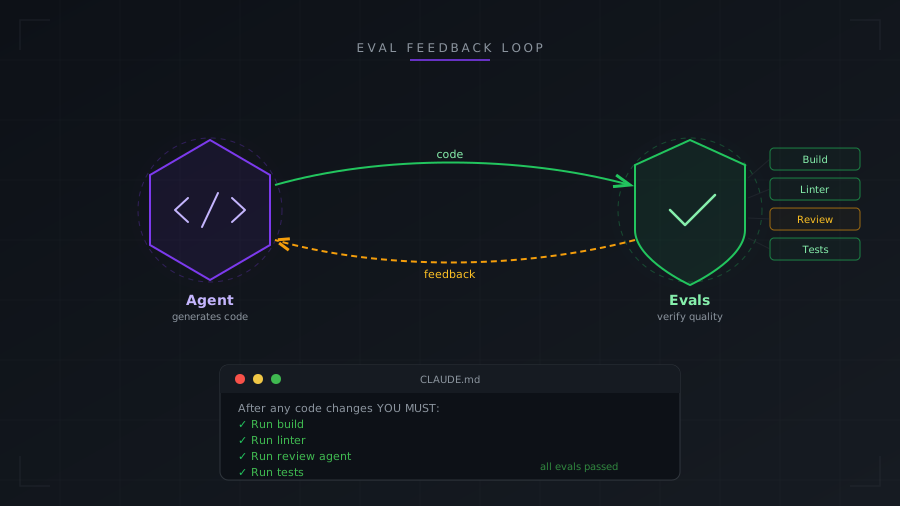
After any code changes YOU MUST:
- [] Run linter and fix errors
- [] Run build to ensure it compiles without errors
- [] Run agent to review the code you just implemented. Agent should check for potential bugs and code complexity. Fix errors reviewer found.
- [] Run tests to make sure system works as expected. Do not change tests without my explicit approval
Summary
Start with several lines in your guidelines file. Add a build check, a linter, a review agent, and tests. You do not need hooks, skills, or custom tooling to begin. These fundamentals compound — each eval you add makes the next one more effective. As a bonus, this is your entry into Agentic Engineering.
| Eval Type | What it catches | Deterministic | Effort to enable |
|---|---|---|---|
| Build | Compilation errors, missing imports | Yes | One line |
| Linters | Code complexity, style violations | Yes | One line |
| Code Review Agent | Logic issues, architectural violations | No | A few lines |
| Automated Tests | Regressions, broken behavior | Yes | Requires test suite |
Ready to Adopt AI Strategically?
Let’s talk about how to prepare your team for AI adoption. No sales pitch. Just practical advice from someone who’s done it.