Context Window Management
The 150K rule, monitoring tools, and why I disabled auto-compact.
The Context Rot Problem
You might now that the more context you have in your session, the worse the model performs. Attention degrades. Agent drifts from instructions and makes unexpected decisions. Latency rises, so each response takes longer. And if you are paying per token, not on the subscription, then your expenses rise too.
I am sceptical about 1 million token models because I feel that the best threshold for me is up to 150K tokens per session.
The 150K Rule
Opus now has 1 million tokens of context, but quality still degrades with bloated context. I keep it simple: 150K is my hard limit.
- Under 100,000 tokens — high accuracy, best performance. This is where I do the real work.
- Between 100K and 150K — I usually wrap up things. This window is for small adjustments or questions.
- Above 150K — danger zone. From that moment I do not trust my agent.
Currently the default model from Claude Code gives you 1 million context. I never use it. I still follow the 150K rule to make sure that my model keeps focus.
Monitor Your Context
If you don’t track your context window, you cannot manage it.
/context command
You might run it after every prompt or after every few prompts, so you know where you stand before sending the next feature into development. You can also see how much tokens your tools and guidelines use.
Custom status line
To configure that, you can easily run /status-line and explain what you want. In my case, I have a visual progress bar with a colour scheme — green under 100K, yellow between 100K and 150K, and red above 150K.

For this reason, either use /status-line and configure your status line, or use /context.
Auto-Compact
I am pretty sure that everyone has seen auto-compact in action. Whenever you hit the context limit, your model starts auto-compacting the conversation — basically an advanced prompt to make a summary of everything that was done and everything you told to the model.
But the problem is that auto-compact removes information from your context without telling you what was lost. Your instructions, your constraints, decisions — all of those may silently disappear. It means you lose control.
There is a configuration which allows you to turn off auto-compact. I personally disabled it because I would like to have manual control over that. You can disable it by running /config and setting Auto-compact to false.
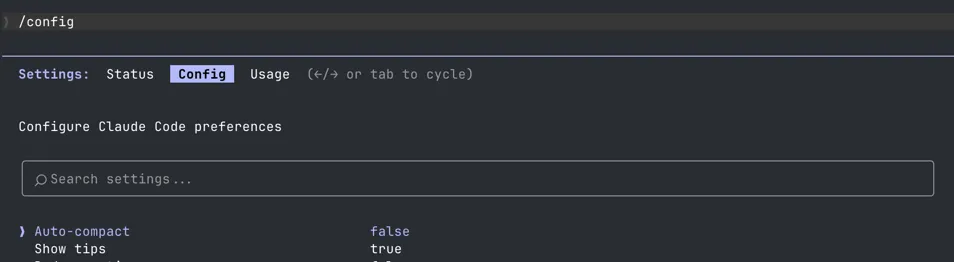
When context gets high, I either ask to summarise what was done, review it, and then I can use the summary as the beginning of the next session. The difference is that I know what is in my summary. I can also give the instructions on what has to be in this summary, what is important for me.
I need to refactor the next module. Make a summary of our conversation
so I can continue in the next session.
Keep all of the details about the refactoring sequence and the structure
of the new data factory.
Do not mention anything specific to communities factory.
Other Ways to Optimise Context
Sometimes 150K is simply not enough for what you need to do. For that reason, I use different techniques to optimise my context window:
- Session strategies — split work into focused sessions, separate investigation from execution. Each session gets a fresh context. More on this in Session Strategies.
- Use swarms — instead of one agent doing everything, spin up multiple agents that each handle a smaller piece of the task. Each agent gets its own fresh context. See Swarms.
- Specialised teams — assign different roles to different agents (reviewer, implementer, architect). Each one works in a narrow context instead of accumulating everything. See Teams.
Takeaways
- With Opus 4.6, use 100K tokens as a soft limit, 150K tokens as a hard limit
- If you don’t track your context window, you cannot manage it — use
/status-lineor/context - Disable auto-compact and take manual control over your summaries
- You are the brain and AI is your hands