Subagents
How to use general and specialised subagents to isolate context and delegate work.
What Are Subagents
Subagents are a technique that lets you isolate context between agents. Instead of one agent doing everything and accumulating a massive context, you split the work — each subagent gets only what it needs.
I use subagents all the time — for analysis, implementation, reviews. They are probably the most important pattern in my workflow.
There are two types: general and specialised.
General Subagents
General subagents have no pre-built instructions. They are spawned by the main agent and receive everything — the task, the constraints, the context — through the prompt.
To invoke them, you simply prompt:
Use 5 Sonnet subagents to make a summary of all e2e tests in all modules.
Split modules between them.
Here I defined the model and the number of agents. Each agent gets assigned one or two modules and keeps its context small. Instead of a single agent reading every test file in the entire project, five agents split the work and each one stays focused.
You can also chain them with different models:
Spawn Haiku agents to analyse all tests in this module and list all test cases.
Run a Sonnet agent to list all use cases in this module with a short summary of what each one does.
Then based on those two outputs, run Opus to implement the missing tests.
Haiku is fast and cheap — perfect for discovery. Sonnet handles the analysis. Opus gets only the summaries it needs and focuses on implementation.
Specialised Subagents
Specialised subagents are defined in the .claude/ directory. They have specific instructions, a configured model, and optionally hooks.
Here is what a specialised agent definition looks like:
---
name: backend-engineer
description: "Implements complete backend feature slices."
model: opus
color: cyan
hooks:
  Stop:
    - hooks:
      - type: command
        command: "\"$CLAUDE_PROJECT_DIR/.claude/hooks/check-agw-api.sh\""
        timeout: 120
---
You are an expert Go backend engineer. You implement COMPLETE feature slices end-to-end.
This agent has its own system prompt, runs on Opus, and has a hook that validates the API on every stop. You configure it once and reuse it across sessions.
Invoking a specialised agent is just as simple — you mention it by name:
Read specs/feature-x.md. Delegate execution to backend-engineer agent.The orchestrator reads the spec, creates a plan, and hands off the implementation to the specialised agent. The agent starts with a clean context, reads only what it needs, and executes.
When to Use Which
General subagents are great for one-off tasks — analysis, discovery, collecting information. You do not need to configure anything. You describe what you need in the prompt and move on.
Specialised agents are for recurring roles. If you keep delegating the same type of work — backend implementation, code review, test writing — it makes sense to define the agent once with proper instructions and hooks. You get consistency across sessions without repeating yourself in every prompt.
Use Case: Full-Stack Development
Let me show why subagents matter with a concrete example — implementing a full-stack feature with backend, frontend, and tests.
Without Subagents
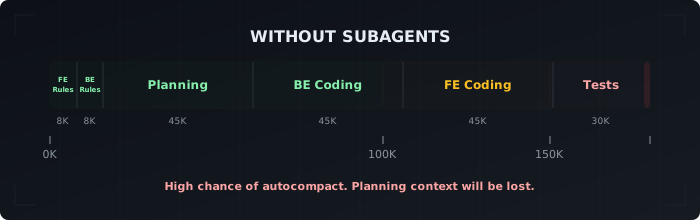
As I covered in the context window management article, AI is most efficient under 100K tokens. That is the green zone — where the model is focused and accurate.
If your assignment is big enough, the agent will spend around 50K on planning and reading guidelines. Then another 40–50K on backend coding. By the time it gets to the frontend, you are already in the yellow zone. Tests push you into the red zone — or trigger autocompact, which wipes out the planning context the agent built earlier.
If you push through, there is a high chance that some requirements will escape. The quality will not hit your standards, or the code will not even compile.
Using Subagents
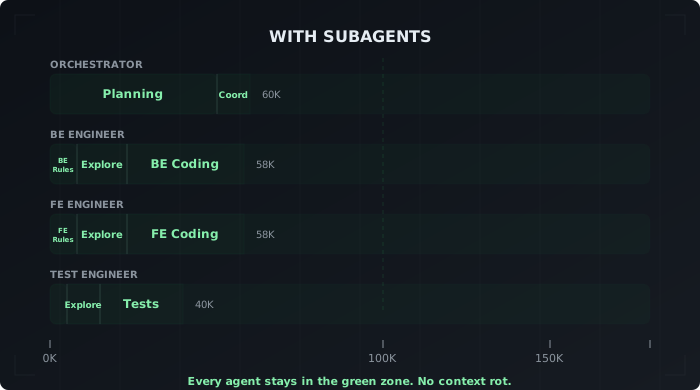
By using subagents, the main agent does not read all the guidelines. It only explores the codebase, does the planning, and then spends some context on orchestrating the subagents. Each subagent reads only the files it needs — guidelines and files to be edited — and works on a specific task. One handles backend, another handles frontend, a third writes tests.
This keeps every agent under 100K tokens. Clean context, focused work, better output.
Read specs/feature-x.md. Delegate execution to backend-engineer, frontend-engineer, and test-engineer agents.The orchestrator only has the high-level picture. It coordinates the work between them. Each agent stays in the green zone.
Takeaways
- Subagents isolate context — each agent gets only what it needs
- General subagents are prompt-based and great for one-off tasks like analysis or discovery
- Specialised subagents are defined in
.claude/with instructions, model, and hooks — use them for recurring roles - You can mix both: specialised agents for implementation, general agents for analysis
- The less context each agent carries, the better the output quality