Session Strategies
One task per session, investigation vs execution, and why splitting sessions gives you better results.
One Task Per Session
This is the simplest strategy and the one I recommend starting with.
Let’s say you are developing a UI which has a new page with table, filter, sorting, and then of course you will need to do some adjustments and bug fixes.
If you try to work in a single session, then your context might bloat and agent will start performing poorly. The quality drops.
What you can do instead is using multiple sessions for this single assignment.
That way you are going to have more focused context windows and much less chance for hallucination.
When you see the task growing bigger than expected — stop. Start a new session.
In many cases 100k context is enough for small feature development. Track your context window usage to better decide when to switch to a new session.
Expensive Planning Problem
What if only planning used ~100K tokens? If I follow 150K rule, then can not continue in that session.
Imagine you need to migrate a module from one API to another. You start in planning mode, agents actively explore, read the code and thinking on plan. When you see your plan, your context is already at 100K+. Now you start coding, and the agent drifts. It forgets constraints you discussed earlier. It makes shortcuts.
The problem is not the task itself — it’s that investigation and execution compete for the same context window.
Clear Context Feature
Claude Code has a feature that lets you clear context after planning mode, before execution starts. You discuss the task, build a plan, and then start fresh with just the plan. I use this for smaller, straightforward features — plan it, clear, execute.
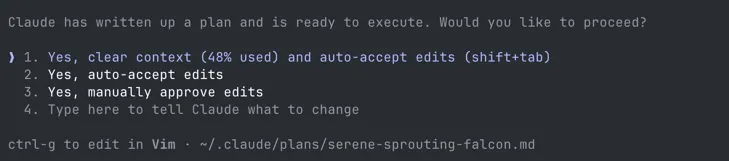
But when the task is bigger or more complex from a product or technical perspective, clearing context is not enough. I switch to investigation sessions.
Investigation vs Execution Sessions
I use two types of sessions — investigation sessions and execution sessions.
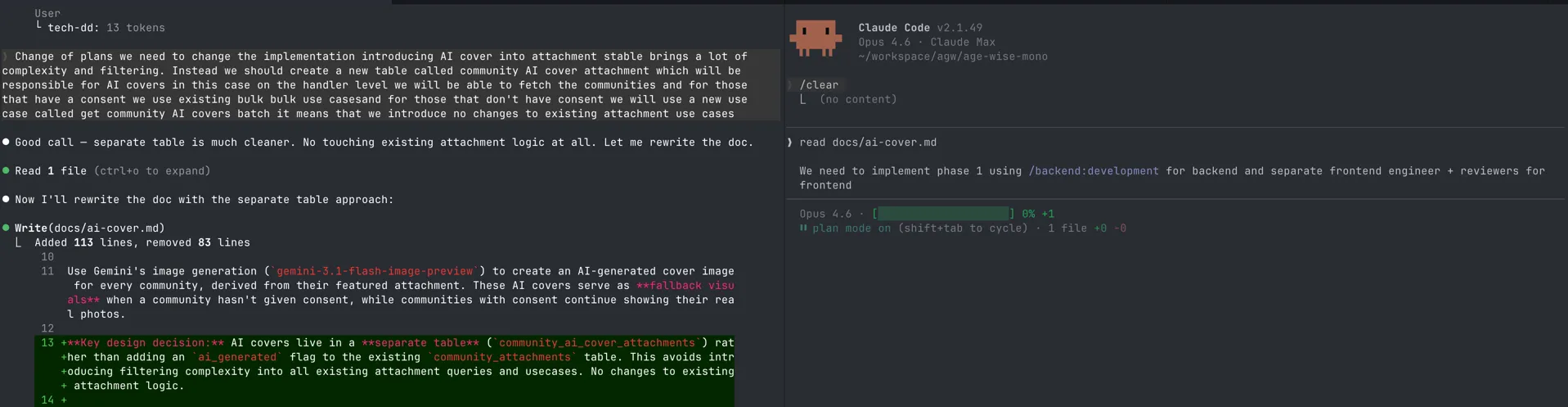
Side note: I often use dictation to explain my thoughts to Claude. It handles text with no punctuation and typos surprisingly well — so do not worry about formatting your prompts perfectly.
Investigation Sessions
In my investigation sessions, I ask the agent to explore, analyse, ask questions, and maybe rubber duck with me. This is usually read-only mode. No code changes, just understanding.
At the end, I offload the summary or the detailed feature description into a document. Even this rubber ducking and exploration can easily consume 50%+ of the context window. I would not want to start development of a feature when my context is already at 50%.
# Example of exploration prompt
We have 15 features that use Gemini API directly.
Each feature uses different Gemini capabilities (context caching,
tool calling, grounded search, media files, etc).

Analyse each feature and create a summary document that lists:
- Every feature in our application that uses Gemini LLM
- Which Gemini capabilities each feature relies on
- Whether OpenRouter API supports each of those capabilities

Read documentation and see if OpenRouter has all capabilities we need.
I want to make sure we do not miss anything before we start the migration.

Save the summary to docs/openrouter-migration-analysis.md
After this session I had a clear picture of what we use and what OpenRouter supports. No code was changed. Just a document I could review, share with my team, and use as input for the execution sessions.
Investigation sessions often go through multiple iterations. As I change technical requirements, discover new constraints, or rethink the approach — the investigation document evolves. It is a living document until I’m ready to execute.
Execution Sessions
Execution sessions are about executing the plan or part of the plan. They usually start with planning mode, and then I accept the edits. By splitting investigation and execution, execution sessions have a more focused context. The summary or detailed plan from the investigation session becomes the input for execution session.
Context stays low. Results stay consistent. The output of execution sessions is working code.
The Workflow
The output of your investigation session becomes the input for your execution session.
Investigation Document vs Agent Plan
These are two different things.
The investigation document is for you. It is a free-form document about your research — edge cases, constraints, thoughts, product description, goals, and technical requirements. You control how much technical detail you want to include. It can be high-level or very specific.
The agent plan is for your agent. It is the output of planning mode — describing what should be implemented and how. You see it once, you approve it, the agent executes, and it is gone.
The important difference is that investigation documents live in your repository. You can revisit them, share them with your team, and use them across multiple sessions. The agent plan is ephemeral — it exists only within the session that created it.
| Investigation Document | Agent Plan | |
|---|---|---|
| For | You | Your agent |
| Contains | Research, edge cases, goals, decisions | Execution steps from your document |
| Created by | You + agents during investigation | Generated by agent in plan mode |
| Persists | Stored in your repository | Gone after the session |
Real Example: LLM Provider Migration
We had to migrate from LLM providers like Gemini and Claude to start using OpenRouter. We had around 10 modules that used the LLM API directly.
| Session | Goal | What happened |
|---|---|---|
| 1 | Explore | Identified all places that use LLM directly. Made a summary document — what each function does, which LLMs it uses, which capabilities it relies on (e.g. prompt caching). |
| 2 | Create OpenRouter client | Planned and executed the OpenRouter service based on the features gathered from the analysis. |
| 3 | Migrate first feature | Migrated the first module to use the OpenRouter client instead of directly using the LLM client. |
| 4 | Migrate all other features | Orchestrated a swarm of agents to refactor all of the remaining modules. |
Four focused sessions instead of one bloated session. Each one had a clear scope and clean context.
Takeaways
- Start with one task per session — when the task grows bigger than expected, stop and start a new session
- Split complex tasks into investigation and execution sessions
- Investigation is read-only: explore, analyse, build a document
- Execution starts from that document with a fresh, focused context
- Never start coding in a session where investigation already consumed half of your context